Read eBooks on your iPhone or iPad
iBooks offers a slick way to download and read books on your iPhone, iPod touch, or iPad. The application comes bundled with the iBookstore, where you can download the latest bestsellers at your leisure.
How does iBooks work?
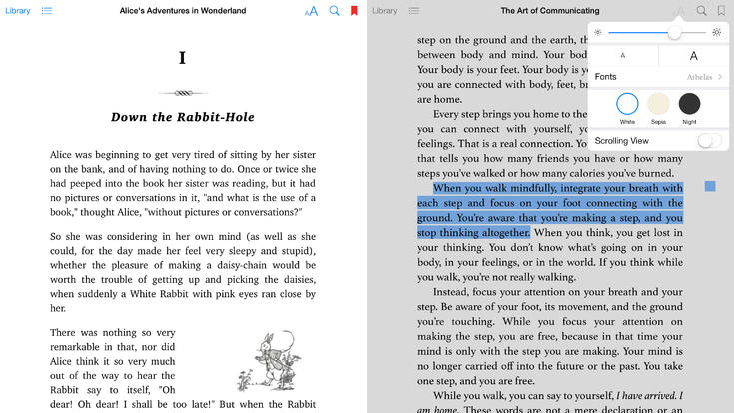
Using iBooks on the iPad is an enjoyable experience. Simply tap on one of the books from the bookshelf and it will load at full screen resolution. Tilt your device on its side and it switches to double-page view, just like reading a real book.
Pages in iBooks are turned by flicking your finger across the screen. This gives a very natural feel and the page turning animation is pretty slick.
In the top-right corner you’ll find some tools to assist your reading experience. There’s a brightness control, text search, and the ability to adjust the font and text size. iBooks also contains three different themes for different viewing styles. You can highlight a piece of text in an eBook and look it up in the dictionary, bookmark it, or perform a web search. iBooks is still missing a few features though, such as the ability to set background color, and pinch-to-zoom.
From store to shelf
The iBookstore that comes with iBooks is handy for buying the latest popular fiction and non-fiction. You can download samples of the books for free and check them out in iBooks before you buy. The store is by no means perfect, and browsing can be cumbersome. Things are improving though, and the latest version makes it easier to browse by author or genre.
The virtual bookshelf where all of your eBooks are stored in iBooks could also be better. In fact, the new iOS 7-style design is arguably a step backwards from the previous interface, which had the warm look of a real bookshelf. Now the books just look like thumbnail images floating on a gray background.
The final word
iBooks offers a very large catalog of books to choose from and the reading interface is comfortable. However, the design of the store and the bookshelf interfaces could be improved.

























User reviews about Apple Books
by Anonymous
Great Way To Read Books On Your iPhone.
This is a very good app that allows you to find eBooks to read on your iPhone. There are both free and paid eBooks available and the cute bookself is a nice added features to store your downloaded eBook. You can even customize the text size of the eBook your reading.The downside is while it's better looking and easier to manage than Kindle, it has less eBooks available than the Kindle app. It also can lag majorly while trying to open the eBook as well as flipping through the pages. All and all the way it makes eBooks easy to access and not needing an addition account like you do for Kindle makes iBooks a nice app to have for eBook readers who wish to read their favorite books on the good. Just remember it will lag at times.
Pros:
Eye Pleasing Bookcase
Makes You Favorite eBooks Easy To Find
Ability To Customize The Text Size
Free
Cons:
Can Lag A Bit
Doesn't Have The Selection Of eBooks That Kindle Does More